Quality on Demand API
QoD for enhanced communication (0.10.1)
Download OpenAPI specification:Download
The Quality-On-Demand (QoD) API provides programmable interface for developers and other users (capabilities consumers) to request stable latency or throughput managed by Telco networks without the necessity to have an in-depth knowledge of the 4G/5G system or the overall complexity of the Telecom Systems.
Industrial (IoT), VR/Gaming, live video streaming, autonomous driving and many other scenarios demand network communication quality and are sensitive to any change in transmission conditions. Being able to request a stable latency (reduced jitter) or prioritized throughput from the network can improve user experience substantially.
The QoD API offers the application developers the capability to request for stable latency (reduced jitter) or throughput for some specified application data flows between application clients (within a user device) and Application Servers (backend services). The developer has a pre-defined set of Quality of Service (QoS) profiles which they could choose from depending on their latency or throughput requirements.

The usage of the API is based on QoS session resources, which can be created (based on available QoS profiles), queried and deleted. The deletion of a requested session can be triggered by the API consumer or can be triggered automatically. The automatic process is triggered either when the requested specified duration of a QoS session has reached its limit or the default session expiration time has been reached (within an example provider implementation it is set to 24hrs).
QOD service endpoint: The URL pointing to the RESTful resource of the QoD API.
Authentication: Security access keys such as OAuth 2.0 client credentials used by client applications to invoke the QoD API.
QoS profiles and QoS profile labels: Latency or throughput requirements of the application mapped to relevant QoS profile class.
Identifier for the device: At least one identifier for the device (user equipment) out of four options: IPv4 address, IPv6 address, Phone number, or Network Access Identifier [5] assigned by the mobile network operator for the device.
Identifier for the application server: IPv4 and/or IPv6 address of the application server (application backend)
App-Flow (between the application client and application server): The precise application data flow the developer wants to prioritize and have stable latency or throughput for. This flow is in the current API version determined by the identifiers used for the device and the application server. And it can be further elaborated with details such as ports or port-ranges. Future version of the API might allow more detailed flow identification features.
Duration: Duration (in seconds) for which the QoS session (between application client and application server) should be created. This parameter is optional. When not specified, a default session duration (e.g. 24 hours) is applied. The user may request a termination before its expiration.
Notification URL and token: Developers may provide a callback URL on which notifications about all status change events of the session (eg. session termination) can be received from the service provider. This is an optional parameter.
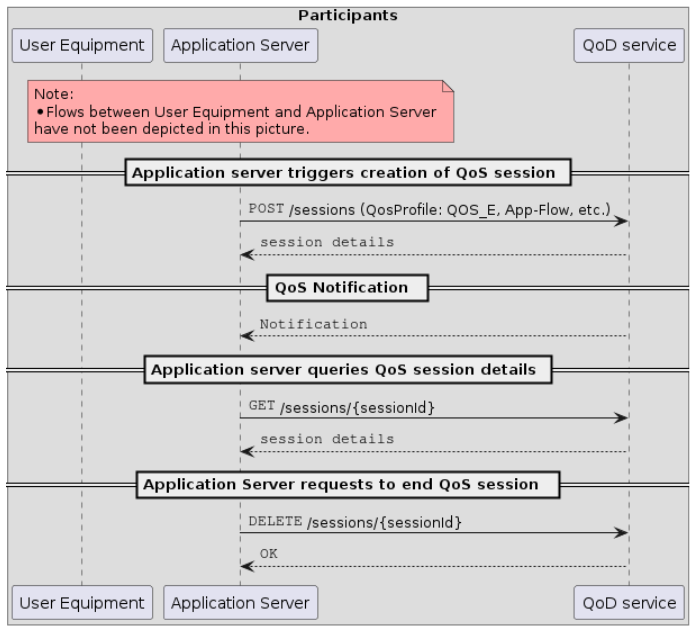
The usage of the QoD API is based on QoS profile classes and parameters which define App-Flows. Based on the API, QoS session resources can be created, queried, and deleted. Once an offered QoS profile class is requested, application users get a prioritized service with stable latency or throughput even in the case of congestion. The QoD API has the following characteristics:
- A specified App-Flow is prioritized to ensure stable latency or throughput for that flow.
- The prioritized App-Flow is described by providing information such as device IP address (or other device identifier) & application server IP addresses and port/port-ranges.
- The developer can optionally specify the duration for which they need the prioritized App-flow.
- Stable latency or throughput is requested by selecting from the list of QoS profiles made available by the service provider (e.g. QOS_E) to map latency and throughput requirements.
- The developer can optionally also specify callback URL on which notifications for the session can be sent.
Following diagram shows the interaction between different components
How QoS profiles are mapped to connectivity characteristics are subject to agreements between the communication service provider and the API invoker. Within the CAMARA project, you can find a sample for such a mapping of QoS profiles. CAMARA QoS Profiles Mapping Table (REFERENCE DRAFT)
Creates a new session
Create QoS Session to manage latency/throughput priorities
If the qosStatus in the API response is "AVAILABLE" and a notification callback is provided the client will receive in addition to the response a
QOS_STATUS_CHANGED event notification with qosStatus as AVAILABLE.
If the qosStatus in the API response is REQUESTED, the client will receive either
- a
QOS_STATUS_CHANGEDevent notification withqosStatusasAVAILABLEafter the network notifies that it has created the requested session, or - a
QOS_STATUS_CHANGEDevent notification withqosStatusasUNAVAILABLEandstatusInfoasNETWORK_TERMINATEDafter the network notifies that it has failed to provide the requested session.
A QOS_STATUS_CHANGED event notification with qosStatus as UNAVAILABLE will also be send if the network terminates the session before the requested duration expired
NOTE: in case of a QOS_STATUS_CHANGED event with qosStatus as UNAVAILABLE and statusInfo as NETWORK_TERMINATED the resources of the QoS session
are not directly released, but will get deleted automatically at earliest 360 seconds after the event.
This behavior allows clients which are not receiving notification events but are polling to get the session information with
the qosStatus UNAVAILABLE (the statusInfo parameter is not included in the current version but will be adding to SessionInfo in an upcoming release). Before a client can attempt to create a new QoD session
for the same device and flow period they must release the session resources with an explicit delete operation if not yet automatically deleted.
Authorizations:
Request Body schema: application/jsonrequired
Parameters to create a new session
required | object (Device) non-empty End-user equipment able to connect to a mobile network. Examples of devices include smartphones or IoT sensors/actuators. The developer can choose to provide the below specified device identifiers:
NOTE: the MNO might support only a subset of these options. The API invoker can provide multiple identifiers to be compatible across different MNOs. In this case the identifiers MUST belong to the same device |
required | object (ApplicationServer) non-empty A server hosting backend applications to deliver some business logic to clients. The developer can choose to provide the below specified device identifiers:
|
object non-empty The ports used locally by the device for flows to which the requested QoS profile should apply. If omitted, then the qosProfile will apply to all flows between the device and the specified application server address and ports | |
object non-empty A list of single ports or port ranges on the application server | |
| qosProfile required | string <string> (QosProfileName) [ 3 .. 256 ] characters ^[a-zA-Z0-9_.-]+$ A unique name for identifying a specific QoS profile. This may follow different formats depending on the service providers implementation. Some options addresses:
|
object | |
| duration | integer <int32> [ 1 .. 86400 ] Default: 86400 Session duration in seconds. Maximal value of 24 hours is used if not set.
After session is expired the, client will receive a
|
Responses
Callbacks
Request samples
- Payload
{- "device": {
- "phoneNumber": "123456789",
- "networkAccessIdentifier": "123456789@domain.com",
- "ipv4Address": {
- "publicAddress": "84.125.93.10",
- "publicPort": 59765
}, - "ipv6Address": "2001:db8:85a3:8d3:1319:8a2e:370:7344"
}, - "applicationServer": {
- "ipv4Address": "192.168.0.1/24",
- "ipv6Address": "2001:db8:85a3:8d3:1319:8a2e:370:7344"
}, - "devicePorts": {
- "ranges": [
- {
- "from": 5010,
- "to": 5020
}
], - "ports": [
- 5060,
- 5070
]
}, - "applicationServerPorts": {
- "ranges": [
- {
- "from": 5010,
- "to": 5020
}
], - "ports": [
- 5060,
- 5070
]
}, - "qosProfile": "QCI_1_voice",
- "webhook": {
- "notificationAuthToken": "c8974e592c2fa383d4a3960714"
}, - "duration": 86400
}Response samples
- 201
- 400
- 401
- 403
- 409
- 500
- 501
- 503
{- "device": {
- "phoneNumber": "123456789",
- "networkAccessIdentifier": "123456789@domain.com",
- "ipv4Address": {
- "publicAddress": "84.125.93.10",
- "publicPort": 59765
}, - "ipv6Address": "2001:db8:85a3:8d3:1319:8a2e:370:7344"
}, - "applicationServer": {
- "ipv4Address": "192.168.0.1/24",
- "ipv6Address": "2001:db8:85a3:8d3:1319:8a2e:370:7344"
}, - "devicePorts": {
- "ranges": [
- {
- "from": 5010,
- "to": 5020
}
], - "ports": [
- 5060,
- 5070
]
}, - "applicationServerPorts": {
- "ranges": [
- {
- "from": 5010,
- "to": 5020
}
], - "ports": [
- 5060,
- 5070
]
}, - "qosProfile": "QCI_1_voice",
- "webhook": {
- "notificationAuthToken": "c8974e592c2fa383d4a3960714"
}, - "sessionId": "f6567dd8-e069-418e-8893-7d22fcf12459",
- "duration": 86400,
- "startedAt": 1639479600,
- "expiresAt": 1639566000,
- "qosStatus": "REQUESTED",
- "messages": [
- {
- "severity": "INFO",
- "description": "string"
}
]
}Callback payload samples
{- "id": "83a0d986-0866-4f38-b8c0-fc65bfcda452",
- "specversion": "1.0",
- "type": "org.camaraproject.qod.v0.qos-status-changed",
- "time": "2021-12-12T00:00:00Z",
- "data": {
- "sessionId": "123e4567-e89b-12d3-a456-426614174000",
- "qosStatus": "UNAVAILABLE",
- "statusInfo": "DURATION_EXPIRED"
}
}Get QoS session information
Querying for QoS session resource information details
Authorizations:
path Parameters
| sessionId required | string <uuid> (SessionId) Session ID that was obtained from the createSession operation |
Responses
Response samples
- 200
- 400
- 401
- 403
- 404
- 500
- 503
{- "device": {
- "phoneNumber": "123456789",
- "networkAccessIdentifier": "123456789@domain.com",
- "ipv4Address": {
- "publicAddress": "84.125.93.10",
- "publicPort": 59765
}, - "ipv6Address": "2001:db8:85a3:8d3:1319:8a2e:370:7344"
}, - "applicationServer": {
- "ipv4Address": "192.168.0.1/24",
- "ipv6Address": "2001:db8:85a3:8d3:1319:8a2e:370:7344"
}, - "devicePorts": {
- "ranges": [
- {
- "from": 5010,
- "to": 5020
}
], - "ports": [
- 5060,
- 5070
]
}, - "applicationServerPorts": {
- "ranges": [
- {
- "from": 5010,
- "to": 5020
}
], - "ports": [
- 5060,
- 5070
]
}, - "qosProfile": "QCI_1_voice",
- "webhook": {
- "notificationAuthToken": "c8974e592c2fa383d4a3960714"
}, - "sessionId": "f6567dd8-e069-418e-8893-7d22fcf12459",
- "duration": 86400,
- "startedAt": 1639479600,
- "expiresAt": 1639566000,
- "qosStatus": "REQUESTED",
- "messages": [
- {
- "severity": "INFO",
- "description": "string"
}
]
}Delete a QoS session
Release resources related to QoS session
If the notification callback is provided and the qosStatus of the session was AVAILABLE the client will receive in addition to the response a QOS_STATUS_CHANGED event with
qosStatusasUNAVAILABLEandstatusInfoasDELETE_REQUESTEDThere will be no notification event if theqosStatuswas alreadyUNAVAILABLE.
Authorizations:
path Parameters
| sessionId required | string <uuid> (SessionId) Session ID that was obtained from the createSession operation |
Responses
Response samples
- 400
- 401
- 403
- 404
- 500
- 503
{- "status": 400,
- "code": "INVALID_ARGUMENT",
- "message": "Schema validation failed at ..."
}Extend the duration of an active session
Extend the overall duration of an active QoS session. If this operation is executed successfully, the new duration of the target session will be the original duration plus the additionally requested duration.
The new remaining duration of the QoS session shall not exceed the maximum remaining duration limit (currently fixed at 86,400 seconds) where the remaining duration is calculated as the difference between the expiresAt and current time when the request to extend the session duration is received. If this maximum limit would be exceeded, the overall duration shall be set such that the remaining duration is equal to this limit.
An example: A QoD session was originally created with duration 80,000 seconds. 10,000 seconds later, the developer requested to extend the session by 20,000 seconds.
- Original duration: 80,000 seconds
- Elapsed time: 10,000 seconds
- Remaining duration: 70,000 seconds
- New remaining duration: 86,400 seconds (the maximum allowed)
- New overall session duration: 96,400 seconds
Authorizations:
path Parameters
| sessionId required | string <uuid> (SessionId) Session ID that was obtained from the createSession operation |
Request Body schema: application/jsonrequired
Parameters to extend the duration of an active session
| requestedAdditionalDuration required | integer <int32> [ 1 .. 86399 ] Additional duration in seconds to be extended. |
Responses
Request samples
- Payload
{- "requestedAdditionalDuration": 60
}Response samples
- 200
- 400
- 401
- 403
- 404
- 500
- 503
{- "device": {
- "phoneNumber": "123456789",
- "networkAccessIdentifier": "123456789@domain.com",
- "ipv4Address": {
- "publicAddress": "84.125.93.10",
- "publicPort": 59765
}, - "ipv6Address": "2001:db8:85a3:8d3:1319:8a2e:370:7344"
}, - "applicationServer": {
- "ipv4Address": "192.168.0.1/24",
- "ipv6Address": "2001:db8:85a3:8d3:1319:8a2e:370:7344"
}, - "devicePorts": {
- "ranges": [
- {
- "from": 5010,
- "to": 5020
}
], - "ports": [
- 5060,
- 5070
]
}, - "applicationServerPorts": {
- "ranges": [
- {
- "from": 5010,
- "to": 5020
}
], - "ports": [
- 5060,
- 5070
]
}, - "qosProfile": "QCI_1_voice",
- "webhook": {
- "notificationAuthToken": "c8974e592c2fa383d4a3960714"
}, - "sessionId": "f6567dd8-e069-418e-8893-7d22fcf12459",
- "duration": 86400,
- "startedAt": 1639479600,
- "expiresAt": 1639566000,
- "qosStatus": "REQUESTED",
- "messages": [
- {
- "severity": "INFO",
- "description": "string"
}
]
}Get All QoS Profiles
Returns all QoS Profiles that match the given criteria. If no criteria is given, all QoS Profiles are returned.
Authorizations:
query Parameters
| name | string QoS Profile name |
| status | string (QosProfileStatusEnum) Enum: "ACTIVE" "INACTIVE" "DEPRECATED" The current status of the QoS Profile
|
Responses
Response samples
- 200
- 401
- 403
- 404
- 500
- 503
[- {
- "name": "QCI_1_voice",
- "description": "QoS profile for video streaming",
- "status": "ACTIVE",
- "targetMinUpstreamRate": {
- "value": 10,
- "unit": "bps"
}, - "maxUpstreamRate": {
- "value": 10,
- "unit": "bps"
}, - "maxUpstreamBurstRate": {
- "value": 10,
- "unit": "bps"
}, - "targetMinDownstreamRate": {
- "value": 10,
- "unit": "bps"
}, - "maxDownstreamRate": {
- "value": 10,
- "unit": "bps"
}, - "maxDownstreamBurstRate": {
- "value": 10,
- "unit": "bps"
}, - "minDuration": {
- "value": 12,
- "unit": "Minutes"
}, - "maxDuration": {
- "value": 12,
- "unit": "Minutes"
}, - "priority": 20,
- "packetDelayBudget": {
- "value": 12,
- "unit": "Minutes"
}, - "jitter": {
- "value": 12,
- "unit": "Minutes"
}, - "packetErrorLossRate": 3
}
]Get QoS Profile for a given name
Returns a QoS Profile that matches the given name.
Authorizations:
path Parameters
| name required | string <string> (QosProfileName) [ 3 .. 256 ] characters ^[a-zA-Z0-9_.-]+$ Example: QCI_1_voice A unique name for identifying a specific QoS profile. This may follow different formats depending on the service providers implementation. Some options addresses:
|
Responses
Response samples
- 200
- 400
- 401
- 403
- 404
- 500
- 503
{- "name": "QCI_1_voice",
- "description": "QoS profile for video streaming",
- "status": "ACTIVE",
- "targetMinUpstreamRate": {
- "value": 10,
- "unit": "bps"
}, - "maxUpstreamRate": {
- "value": 10,
- "unit": "bps"
}, - "maxUpstreamBurstRate": {
- "value": 10,
- "unit": "bps"
}, - "targetMinDownstreamRate": {
- "value": 10,
- "unit": "bps"
}, - "maxDownstreamRate": {
- "value": 10,
- "unit": "bps"
}, - "maxDownstreamBurstRate": {
- "value": 10,
- "unit": "bps"
}, - "minDuration": {
- "value": 12,
- "unit": "Minutes"
}, - "maxDuration": {
- "value": 12,
- "unit": "Minutes"
}, - "priority": 20,
- "packetDelayBudget": {
- "value": 12,
- "unit": "Minutes"
}, - "jitter": {
- "value": 12,
- "unit": "Minutes"
}, - "packetErrorLossRate": 3
}